
Hardening IIS (Internet Information Services) is a critical step in reducing the attack surface of a Windows-based web server. Below are practical security controls typically implemented in production environments.
1️⃣ Keep Windows and IIS Updated
Apply the latest Windows Server security patches.
Regularly update IIS components.
Remove deprecated protocols (SSL 3.0, TLS 1.0).
2️⃣ Disable Unnecessary Features and Modules
Remove unused IIS features:
WebDAV (if not required)
Directory Browsing
Sample applications
Unused authentication methods
In IIS Manager:
Server → Remove Roles and Features
3️⃣ Configure Request Filtering
Request Filtering protects against common attacks.
In IIS Manager:
Server → Request Filtering
Recommended settings:
Block double-encoded requests
Deny specific file extensions (.config, .bak, .sql)
Limit maximum URL length
Limit maximum query string length
4️⃣ Configure Application Pool Isolation
Each website should have its own Application Pool.
Settings to review:
Identity: Use a custom low-privilege account
Maximum Worker Processes: Keep at 1 unless required
Queue Length: Adjust based on load profile
Disable 32-bit apps if not needed
5️⃣ Enable HTTPS and Strong TLS Configuration
Install a valid certificate
Force HTTPS redirect
Disable weak ciphers
Use TLS 1.2 or higher
Bindings:
Site → Bindings → https → Add certificate
6️⃣ Configure Dynamic IP Restrictions (Rate Limiting)
To protect against simple flood attacks:
Install feature:
IIS → Add Role Services → IP and Domain Restrictions
Enable:
Dynamic IP Restrictions
Configure:
Deny IP after X requests in Y seconds
Deny concurrent requests per IP
This helps mitigate application-layer DoS attempts.
7️⃣ Disable Detailed Error Messages
Prevent information disclosure:
Site → Error Pages → Edit Feature Settings
Set:
Detailed errors for local requests only
8️⃣ Enable Logging and Monitoring
Enable:
IIS logging
Failed Request Tracing
Windows Event Logs
Logs location:
C:\inetpub\logs\LogFiles\
Monitoring allows you to detect abnormal traffic patterns early.
Example of a Vulnerable Python HTTP Server (Lab Purpose)
Below is a minimal Python server often used in security labs to demonstrate how poor design can lead to service degradation.
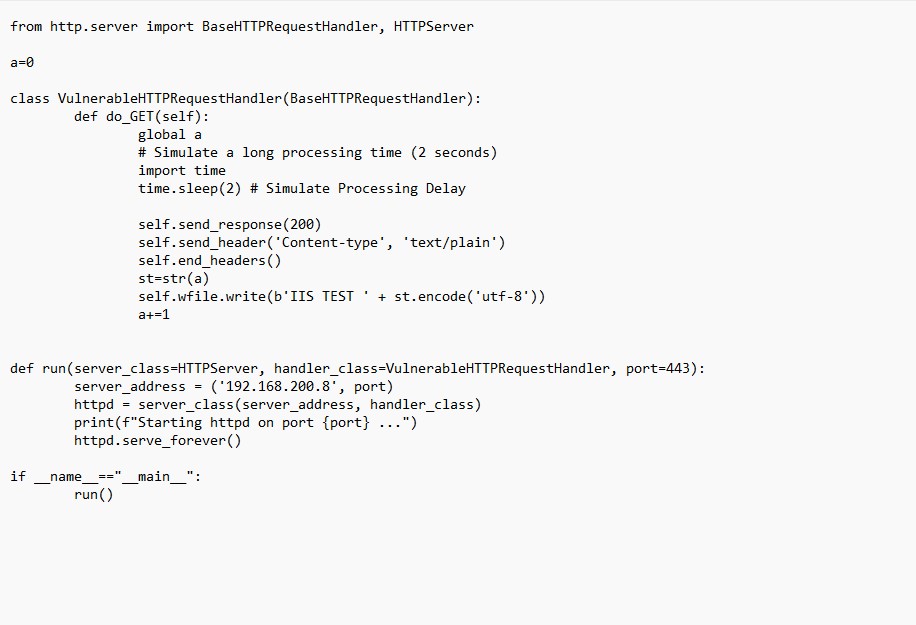
Single-threaded request handling
Artificial 2-second delay per request
No rate limiting
No request queue protection
No authentication
Global shared state (race condition risk)
This type of design allows resource exhaustion under moderate load.
How to Improve / Harden the Python Server (Educational Purpose)
1️⃣ Use ThreadingHTTPServer
from http.server import BaseHTTPRequestHandler, ThreadingHTTPServer
Replace:
HTTPServer
With:
ThreadingHTTPServer
2️⃣ Remove Artificial Delay
Remove:
time.sleep(2)
3️⃣ Add Basic Rate Limiting (Conceptually)
In production, use:
Reverse proxy (NGINX)
IIS Dynamic IP Restrictions
Web Application Firewall
Load balancer
Comparing IIS vs Simple Python Server
Feature IIS Basic Python Server
Kernel-level queue Yes (HTTP.sys) No
Multi-worker model Yes No (default)
Rate limiting Yes No
TLS support Advanced Manual
Logging Built-in Minimal
Production-ready Yes No
Key Security Lesson
Security is not only about firewalls.
Even if a firewall allows traffic:
Weak application design
Poor threading model
Lack of rate limiting
No isolation
Can still lead to service instability.
🔐 Additional IIS Hardening Measures (Recommended Enhancements)
1️⃣ Implement Security HTTP Headers
Adding security headers significantly reduces the risk of XSS, clickjacking, MIME sniffing, and downgrade attacks.
Configure these in IIS:
- Strict-Transport-Security (HSTS)
- X-Content-Type-Options: nosniff
- X-Frame-Options: SAMEORIGIN
- Content-Security-Policy (CSP)
- Referrer-Policy
- Permissions-Policy