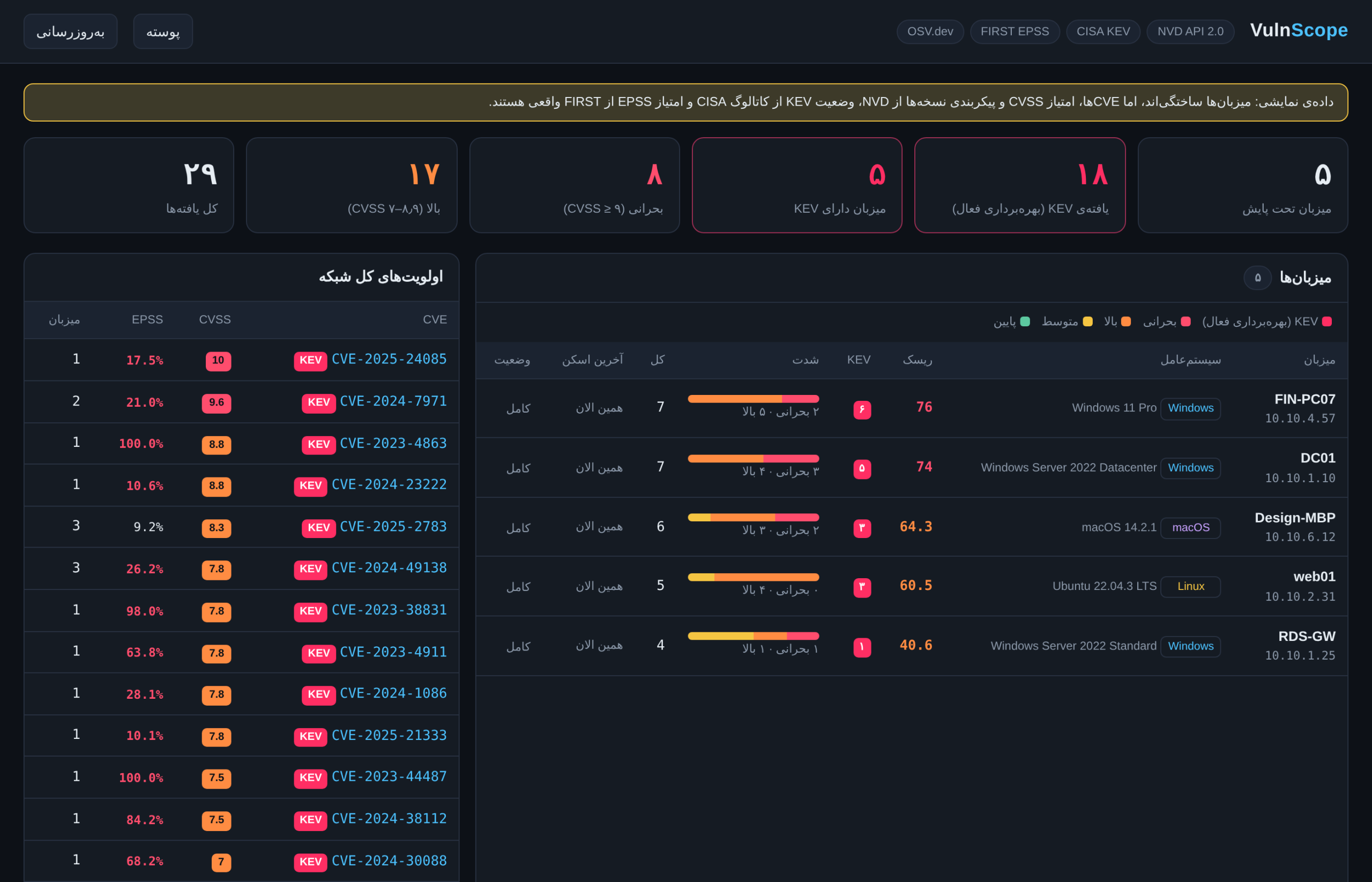
VulnScope is a self-hosted, centralized CVE vulnerability management system for Windows Server, Windows 11/10, Linux and macOS that I designed and built for infrastructure environments. A lightweight agent on each machine collects the exact OS build and installed software; a central server matches that inventory against the most authoritative public sources and ranks every finding by real-world risk in a single dashboard.
What is a CVE? (key concepts)
CVE stands for Common Vulnerabilities and Exposures: a public, global catalog that gives every publicly known security vulnerability in software or hardware a unique identifier. The program has been run by MITRE since 1999 with sponsorship from the US CISA. When a vendor, a scanning tool and your security team all refer to the same ID, there is no ambiguity about which vulnerability is meant.
- ID format:
CVE-YEAR-NUMBER, e.g.CVE-2024-38063. The year is when the ID was reserved, not necessarily when the flaw was found. - Who assigns them? CNAs (CVE Numbering Authorities) such as Microsoft, Google, Red Hat and VMware, which publish CVEs for their own products.
- NVD: the US National Vulnerability Database (NIST), which analyzes each CVE and adds its severity score, weakness type and the exact affected products and versions.
- CVSS: the 0–10 severity standard: 0.1–3.9 Low, 4.0–6.9 Medium, 7.0–8.9 High, 9.0–10 Critical. It is computed from factors such as network exploitability, required privileges and the impact on confidentiality, integrity and availability.
- CPE: a standard naming scheme for products, e.g.
cpe:2.3:o:microsoft:windows_server_2022. NVD uses CPEs to state which versions are vulnerable, and VulnScope uses the same data to check installed versions. - CWE: the weakness category, e.g. out-of-bounds write (CWE-787) or OS command injection (CWE-78).
- CISA KEV: the catalog of vulnerabilities with confirmed active exploitation in the wild – attackers are using them right now.
- EPSS: FIRST’s model that predicts the probability (0–100%) that a CVE will be exploited in the next 30 days.
In short: CVE says which vulnerability, CVSS says how severe, KEV says is it being attacked now, and EPSS says how likely it is to be attacked soon. VulnScope combines all four.
Why CVSS alone is not enough
Every network has thousands of “High” and “Critical” CVEs, yet only a small fraction is ever exploited. VulnScope combines three signals:
- CISA KEV – the official catalog of CVEs with confirmed active exploitation, including the remediation due date and whether the CVE is known to be used in ransomware campaigns.
- FIRST EPSS – the probability that a CVE will be exploited in the next 30 days, plus its percentile.
- NVD (NIST) – CVSS severity, description and the exact vulnerable version ranges (CPE configurations).
- OSV.dev – official Linux distribution advisories, so backported patches are recognized correctly.
A real example: CVE-2024-30088 (Windows kernel) has a CVSS of only 7.0, but it is in CISA KEV, confirmed in ransomware campaigns, with an EPSS of about 68%. It should be patched before CVE-2024-38063 (CVSS 9.8), which is not in KEV.
Key features
- Windows build-level accuracy: the full
10.0.Build.UBRis compared with each CVE’s version range, so installing a Cumulative Update clears the findings on the next scan. - PowerShell agent for Windows (no Python needed); standard-library Python agent for Linux and macOS.
- Fixed version for every finding, ransomware flag, per-host risk score, CSV export and automatic daily rescans.
- No external dependencies: just Python and SQLite – suitable for restricted networks.
- Read-only: no port scanning and no changes to the monitored systems.
Architecture
Agents (Windows, Linux, macOS) → HTTPS + token → VulnScope server (API, scan queue, matching engine, SQLite cache, dashboard) → NVD, CISA KEV, EPSS and OSV.
Step-by-step setup
Step 1 – Central server (e.g. Ubuntu VM on VMware)
A small Linux VM (2 vCPU, 2 GB RAM) with Python 3 is enough. The server needs outbound HTTPS (directly or via proxy) to services.nvd.nist.gov, www.cisa.gov, api.first.org and api.osv.dev. Agents do not need Internet access.
# generate a strong token
python3 -c "import secrets; print(secrets.token_urlsafe(32))"

# TLS certificate (self-signed to start with)
cd vulnscope/server
openssl req -x509 -newkey rsa:3072 -nodes -days 825 -keyout key.pem -out cert.pem -subj "/CN=vulnscope.corp"

# run the server
python3 server.py --port 8443 --token YOUR_TOKEN --cert cert.pem --key key.pem --dashboard-password YOUR_PASSWORD
A free NVD API key (--nvd-key) makes the first scan about 10x faster. To run it permanently, install it as a systemd service:
sudo mkdir -p /opt/vulnscope && sudo cp -r ~/vulnscope/* /opt/vulnscope/
echo 'VULNSCOPE_TOKEN=YOUR_TOKEN' | sudo tee /etc/vulnscope.env && sudo chmod 600 /etc/vulnscope.env
# /etc/systemd/system/vulnscope.service with:
# ExecStart=/usr/bin/python3 server.py --port 8443 --db /opt/vulnscope/vulnscope.db
sudo systemctl daemon-reload && sudo systemctl enable --now vulnscope
sudo ufw allow 8443/tcp
Step 2 – Agent on Windows Server / Windows 11
Important: do not paste the contents of the .ps1 file into the console – run the file itself. Extract the zip (e.g. to C:\Temp\vulnscope), open PowerShell as Administrator and run:
cd C:\Temp\vulnscope\install
Set-ExecutionPolicy -Scope Process Bypass -Force
Unblock-File ..\agent\agent.ps1, .\install-agent-windows.ps1
.\install-agent-windows.ps1 -Server https://SERVER:8443 -Token YOUR_TOKEN -Time 02:30
The installer copies the agent to C:\ProgramData\VulnScope, stores the token readable only by SYSTEM and Administrators, and registers a daily Scheduled Task running as SYSTEM. For many servers, deploy the same script with GPO or SCCM/Intune. To test without installing: .\agent.ps1 -Output C:\Temp\report.json
Step 3 – Agent on Linux
sudo ./install/install-agent-linux.sh https://SERVER:8443 YOUR_TOKEN
systemctl list-timers vulnscope-agent.timer
Fully supported: Ubuntu, Debian, Alpine, Rocky Linux and AlmaLinux (systemd timer, daily).
Step 4 – Agent on macOS
sudo ./install/install-agent-macos.sh https://SERVER:8443 YOUR_TOKEN
tail -f /var/log/vulnscope-agent.log
Step 5 – Using the dashboard
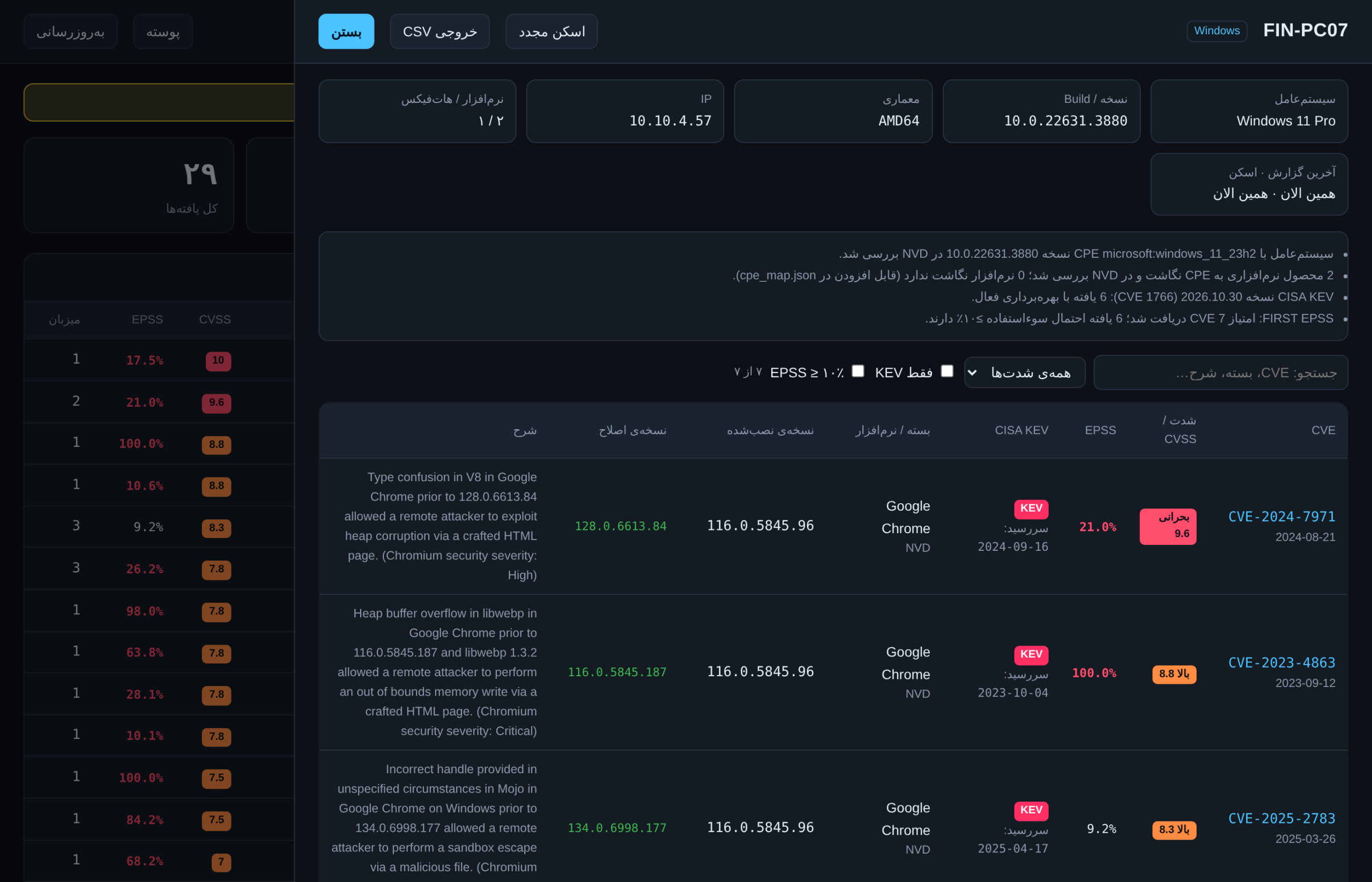
Open https://SERVER:8443. The top cards show KEV, critical and high findings; hosts are sorted by risk score. Click a host to see every CVE with CVSS, EPSS, KEV badge and due date, and the fixed version. Filters (“KEV only”, “EPSS ≥ 10%”) and CSV export are on the same page.
Suggested remediation policy
- P0 (48 hours): KEV with ransomware use, or KEV on an Internet-facing server.
- P1 (7 days): all other KEV findings.
- P2 (14 days): CVSS ≥ 9, or CVSS ≥ 7 with EPSS ≥ 10%.
- P3 (30 days): remaining high findings, in the monthly patch cycle.
- P4 (90 days): medium and low.
Troubleshooting
- PowerShell “Unexpected token”: the script contents were pasted; run the file with
.\install-agent-windows.ps1. - Agent returns unauthorized: the agent token does not match the server token.
- Scan is slow at the NVD stage: add a free NVD API key.
- Error status in the dashboard: the server cannot reach NVD, CISA, FIRST or OSV – check proxy and outbound firewall.
- Windows agent log:
C:\ProgramData\VulnScope\agent.log
Downloads
- Windows agent package (Windows Server, Windows 10/11):
agent.ps1,install-agent-windows.ps1, double-click installerinstall.cmdand a short README. - Linux & macOS agent package:
agent.py,install-agent-linux.shandinstall-agent-macos.sh. - Full VulnScope package: server, dashboard, all agents, installers, tests and demo data – this is what you need on the Ubuntu server.
- Full guide (PDF, Persian)
Easiest way to install on Windows
- Download and extract the Windows agent package.
- Right-click
install.cmdand choose Run as administrator. - Enter the server URL (e.g.
http://192.168.1.50:8443) and the token. That’s it – the agent is installed, runs daily and sends its first report immediately.
Windows file contents
Review the full source before running. Run these files – do not paste their contents into PowerShell.
agent.ps1 — click to view
<#
.SYNOPSIS
  VulnScope Agent for Windows Server 2016/2019/2022/2025 and Windows 10/11 - no Python required.
.DESCRIPTION
  Collects OS version (build + UBR), installed software and hotfixes, then sends them to the
  VulnScope server. Read-only: makes no changes to the system.
.EXAMPLE
  .\agent.ps1 -Output C:\Temp\report.json
  .\agent.ps1 -Server https://vulnscope.corp:8443 -Token YOUR_TOKEN
  .\agent.ps1 -Server https://vulnscope.corp:8443 -TokenFile C:\ProgramData\VulnScope\token.txt
#>
param(
    [string]$Server,
    [string]$Token = $env:VULNSCOPE_TOKEN,
    [string]$TokenFile,
    [string]$Output,
    [switch]$Insecure
)
$ErrorActionPreference = 'Continue'
$AgentVersion = '1.0.1'
$logFile = Join-Path $env:ProgramData 'VulnScope\agent.log'
function Log($msg) {
    $line = "$(Get-Date -Format s) $msg"
    Write-Host $line
    try { Add-Content -Path $logFile -Value $line -ErrorAction Stop } catch {}
}

if ($TokenFile -and (Test-Path $TokenFile)) { $Token = (Get-Content $TokenFile -Raw).Trim() }

$cv = Get-ItemProperty 'HKLM:\SOFTWARE\Microsoft\Windows NT\CurrentVersion'
$build = [string]$cv.CurrentBuildNumber
$ubr = [int]$cv.UBR
$product = [string]$cv.ProductName
if ($cv.InstallationType -eq 'Client' -and [int]$build -ge 22000) {
    $product = $product -replace 'Windows 10', 'Windows 11'   # known registry quirk on Windows 11
}
$display = if ($cv.DisplayVersion) { $cv.DisplayVersion } else { $cv.ReleaseId }

$paths = @(
    'HKLM:\SOFTWARE\Microsoft\Windows\CurrentVersion\Uninstall\*',
    'HKLM:\SOFTWARE\WOW6432Node\Microsoft\Windows\CurrentVersion\Uninstall\*',
    'HKCU:\SOFTWARE\Microsoft\Windows\CurrentVersion\Uninstall\*'
)
$seen = @{}
$packages = @()
foreach ($p in (Get-ItemProperty $paths -ErrorAction SilentlyContinue)) {
    if (-not $p.DisplayName -or -not $p.DisplayVersion) { continue }
    if ($p.SystemComponent -eq 1 -or $p.ParentKeyName) { continue }
    $key = "$($p.DisplayName)|$($p.DisplayVersion)"
    if ($seen.ContainsKey($key)) { continue }
    $seen[$key] = $true
    $packages += [ordered]@{ name = [string]$p.DisplayName; version = [string]$p.DisplayVersion
                             publisher = [string]$p.Publisher; manager = 'windows' }
}

$hotfixes = @(Get-HotFix -ErrorAction SilentlyContinue | Select-Object -ExpandProperty HotFixID)
$machineId = (Get-ItemProperty 'HKLM:\SOFTWARE\Microsoft\Cryptography').MachineGuid
$ips = @()
try {
    $ips = @(Get-NetIPAddress -AddressFamily IPv4 -ErrorAction Stop |
             Where-Object { $_.IPAddress -notlike '127.*' -and $_.IPAddress -notlike '169.254.*' } |
             Select-Object -ExpandProperty IPAddress)
} catch {}
$fqdn = $env:COMPUTERNAME
try { $fqdn = [System.Net.Dns]::GetHostEntry($env:COMPUTERNAME).HostName } catch {}

$report = [ordered]@{
    schema        = 1
    agent_version = "$AgentVersion-ps"
    collected_at  = (Get-Date).ToUniversalTime().ToString('o')
    host          = [ordered]@{
        machine_id = $machineId
        hostname   = $env:COMPUTERNAME
        fqdn       = $fqdn
        ips        = $ips
        os         = [ordered]@{
            family = 'windows'; name = $product; version = "10.0.$build.$ubr"; build = $build; ubr = $ubr
            display_version = $display; installation_type = $cv.InstallationType; edition = $cv.EditionID
            kernel = ''; distro_id = ''; distro_version = ''; arch = $env:PROCESSOR_ARCHITECTURE
        }
    }
    packages      = $packages
    hotfixes      = $hotfixes
}

$json = $report | ConvertTo-Json -Depth 6 -Compress
Log "[+] $($env:COMPUTERNAME) | $product (10.0.$build.$ubr) | $($packages.Count) apps | $($hotfixes.Count) hotfixes"

if ($Output) {
    [System.IO.File]::WriteAllText($Output, $json, (New-Object System.Text.UTF8Encoding $false))
    Log "[+] Saved: $Output"
}
if ($Server) {
    if (-not $Token) { Log '[!] Token required (-Token, -TokenFile or VULNSCOPE_TOKEN)'; exit 2 }
    [Net.ServicePointManager]::SecurityProtocol = [Net.SecurityProtocolType]::Tls12
    if ($Insecure -and $PSVersionTable.PSVersion.Major -lt 6) {
        [System.Net.ServicePointManager]::ServerCertificateValidationCallback = { $true }
    }
    $params = @{
        Uri             = ($Server.TrimEnd('/') + '/api/report')
        Method          = 'Post'
        ContentType     = 'application/json; charset=utf-8'
        Headers         = @{ Authorization = "Bearer $Token" }
        Body            = [System.Text.Encoding]::UTF8.GetBytes($json)
        UseBasicParsing = $true
    }
    if ($Insecure -and $PSVersionTable.PSVersion.Major -ge 6) { $params.SkipCertificateCheck = $true }
    try {
        $res = Invoke-RestMethod @params
        Log "[+] Sent. Host ID: $($res.host_id) - scan queued"
    } catch {
        Log "[!] Send failed: $($_.Exception.Message)"
        exit 1
    }
}
if (-not $Output -and -not $Server) { $json.Substring(0, [Math]::Min(2000, $json.Length)) }
install-agent-windows.ps1 — click to view
# VulnScope Agent installer for Windows Server / Windows 10 / Windows 11
# Run from an elevated PowerShell (Run as Administrator), as a FILE - do not paste the contents:
#   Set-ExecutionPolicy -Scope Process Bypass -Force
#   .\install-agent-windows.ps1 -Server https://vulnscope.corp:8443 -Token YOUR_TOKEN -Time 02:30
param(
    [Parameter(Mandatory = $true)] [string]$Server,
    [Parameter(Mandatory = $true)] [string]$Token,
    [string]$Time = '02:30'
)
$ErrorActionPreference = 'Stop'

$principal = New-Object Security.Principal.WindowsPrincipal([Security.Principal.WindowsIdentity]::GetCurrent())
if (-not $principal.IsInRole([Security.Principal.WindowsBuiltInRole]::Administrator)) {
    throw 'Please run this script from an elevated PowerShell (Run as Administrator).'
}

$src = Join-Path $PSScriptRoot '..\agent\agent.ps1'
if (-not (Test-Path $src)) { $src = Join-Path $PSScriptRoot 'agent.ps1' }
if (-not (Test-Path $src)) { throw "agent.ps1 not found next to the installer or in ..\agent\" }

$dir = 'C:\ProgramData\VulnScope'
New-Item -ItemType Directory -Force -Path $dir | Out-Null
Copy-Item -Force $src "$dir\agent.ps1"

# Token readable only by SYSTEM and Administrators
Set-Content -Path "$dir\token.txt" -Value $Token.Trim() -NoNewline -Encoding ASCII
icacls $dir /inheritance:r /grant:r 'SYSTEM:(OI)(CI)F' 'Administrators:(OI)(CI)F' | Out-Null

$arg = "-NoProfile -ExecutionPolicy Bypass -File `"$dir\agent.ps1`" -Server `"$Server`" -TokenFile `"$dir\token.txt`""
$action  = New-ScheduledTaskAction -Execute 'powershell.exe' -Argument $arg
$trigger = New-ScheduledTaskTrigger -Daily -At $Time
$setting = New-ScheduledTaskSettingsSet -StartWhenAvailable -ExecutionTimeLimit (New-TimeSpan -Minutes 30)
$taskUser = New-ScheduledTaskPrincipal -UserId 'SYSTEM' -LogonType ServiceAccount -RunLevel Highest
Register-ScheduledTask -TaskName 'VulnScope Agent' -Action $action -Trigger $trigger -Settings $setting `
    -Principal $taskUser -Force | Out-Null

Start-ScheduledTask -TaskName 'VulnScope Agent'
Write-Host "[+] Installed. Runs daily at $Time as SYSTEM; first run started now." -ForegroundColor Green
Write-Host "    Check: Get-ScheduledTaskInfo -TaskName 'VulnScope Agent'"
install.cmd — click to view
@echo off
REM VulnScope Agent - double-click installer (right-click > Run as administrator)
net session >nul 2>&1
if %errorlevel% neq 0 (
  echo Please right-click install.cmd and choose "Run as administrator".
  pause
  exit /b 1
)
set /p SERVER=VulnScope server URL (example: http://192.168.1.50:8443):
set /p TOKEN=Agent token:
powershell.exe -NoProfile -ExecutionPolicy Bypass -Command "Unblock-File '%~dp0agent.ps1','%~dp0install-agent-windows.ps1'; & '%~dp0install-agent-windows.ps1' -Server '%SERVER%' -Token '%TOKEN%'"
echo.
echo Log file: C:\ProgramData\VulnScope\agent.log
pause